Feedback on BMW Scanner 1.4.0

  • Click here to become an Official Member of BMW Club Malaysia Download Form
IanDaddy;610649 said:
Funny the DME can only be scanned after ignition, what happens if the engine would not crank ? You will not be able to get the fault codes.
Also , I think some of the functions are advance and can be dangerous if done wrongly or accidentally. e.g. the disable car keys, I wonder if this process is reversible , if not you don't want to disable it and end up having to get new keys.

Jarance, I am trying the look for a user guide or manual on the Net. Even if it is in Russian !


Bro Ian just notice today the DME can be scanned without ignition.
Go to setting and UNCHECKED the Run car identification at startup
 
bimmerholic;630142 said:
Live Data Available.
1. Jarance - E46/2005 - 325i M-Sport
2. B33mer - E46/2002 - 330i SMG M-Sport2 Euro Spec
3. haywire - E39/2003 - 530i UK import.
4. IanDaddy - E46 325i 2004 M54B25
5. zidee - E39/2000 - 525i UK Spec
6. hky - E39/2001 - 525i M-Sport DME 7.545.150
7. Neohkw - E39/2001 - 525i Jap Spec
8 Xcrave - e46/1999 - 320i 6l Jap. Spec
9.nitedevil- E39/2003-CKD 520i

Live Data Not Available.
1. T2ribena - 2001 E39 M5 S62B50
2. XXX - E39/
3) Solo - 2001 E46 M43TUB19 Pre-facelift
4) jeffreyewe - E83 X3 2007
5. fugowitz - E85/2004.
6. Alex5522 - E46/2000 6cyl Jpn Spec
7. kby*8* - E46 318i (N42)
8. moots - E39/1997 M52B28 UK spec
9. m3addict - E46 318i / N42
10. bimmerholic - E39 523i M52B25 1997 GERMANY CBU
 
Alex5522;630203 said:
Bro Ian just notice today the DME can be scanned without ignition.
Go to setting and UNCHECKED the Run car identification at startup

Thanks Alex, I got it working already.
 
Live Data Available.
1. Jarance - E46/2005 - 325i M-Sport
2. B33mer - E46/2002 - 330i SMG M-Sport2 Euro Spec
3. haywire - E39/2003 - 530i UK import.
4. IanDaddy - E46 325i 2004 M54B25
5. zidee - E39/2000 - 525i UK Spec
6. hky - E39/2001 - 525i M-Sport DME 7.545.150
7. Neohkw - E39/2001 - 525i Jap Spec
8 Xcrave - e46/1999 - 320i 6l Jap. Spec
9.nitedevil- E39/2003-CKD 520i
10.sewell- E39/2003-CKD 520i

Live Data Not Available.
1. T2ribena - 2001 E39 M5 S62B50
2. XXX - E39/
3) Solo - 2001 E46 M43TUB19 Pre-facelift
4) jeffreyewe - E83 X3 2007
5. fugowitz - E85/2004.
6. Alex5522 - E46/2000 6cyl Jpn Spec
7. kby*8* - E46 318i (N42)
8. moots - E39/1997 M52B28 UK spec
9. m3addict - E46 318i / N42
10. bimmerholic - E39 523i M52B25 1997 GERMANY CBU
 
OK, Managed to resolve the 64bit driver for the USb port.

Just found out that FTDI have the latest software version CDM20814 dated 12-04-2011.

This driver works for the scanner 1.4.0.

I will do some screen shot and compile it for those in the group buy.
 
My Vanos does not turn to Yes for any of the options when I revved the engine... Does that mean my Vanos is kaput???

Neoh

haywire;629900 said:
Vanos only kick in above certain rpm. Try revving it up and see if it turns to 'Yes'.
 
neohkw;630589 said:
My Vanos does not turn to Yes for any of the options when I revved the engine... Does that mean my Vanos is kaput???

Neoh

Neoh, better have it check with the specialist ASAP.
 
xcrave;630638 said:
Hmmm... Jarance thats what the link i posted here last time :p

yup, it the same link that i posted in post#3. the driver have been updated just recently.


I heard that you want to sell your scanner. Ade is interested in buying. PM him lar.
 
Yeah he did... well im selling soon but now too busy to arrange anything so i reserved for him just use 2 time lol... then wanna sell ody im waiting for my INPA-Ediabas...
 
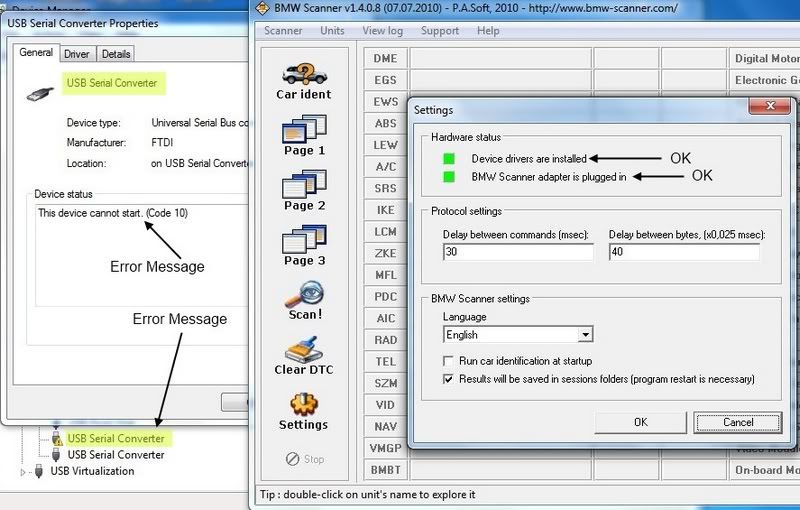
Can anyone explain this?

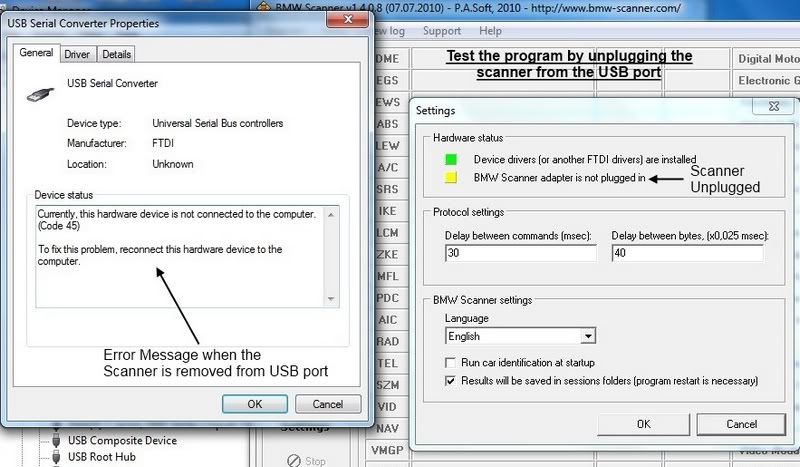
USB driver have error but the program is running well.

I have installed the USB driver for the Win 7-64 bits but have error message. xcrave have pointed out to ignore this.
Try the scanner on my car and it works.

workingwitherror.jpg
 
Jarance ur doing it right but with a wrong Driver or option this is what you should have done (i do not have the cable in the office)

There is a downloaded FTDI folder inside there is *Bus and *Port, Im using >>>ftdibus.ini>>> Serial Converter

Ive tried the USB to Serial too and set to COM Port 1 and it does detect... Its kinda hard for me to do this in office... but will uninstall it once i got home and do a proper tutorial (if i have time)

But for all of those Win 7-64bit user , IMHO there is a set of required level of 64-bit OS mastery to understand what are we implying in this forum. For once the driver are in different Architecture to communicate with 64 bit OS and the later would be choosing the right function you want the device to perform

In this case you want the SERIAL ---> USB to be read at the same time....
So your goal is to find the FTDI chip to communicate in Serial to USB mode to the program...

I hope it will help others in installing the driver...

All you need are these drivers:

x64 (64 Bit OS) (This includes XP, VISTA and Win7 64Bit Architecture)

FTDI d2xx (D2XX drivers allow direct access to the USB device through a DLL.)
http://www.ftdichip.com/Drivers/CDM/CDM20814_WHQL_Certified.zip

FOR SERIAL
(Virtual COM port (VCP) drivers cause the USB device to appear as an additional COM port available to the PC. Application software can access the USB device in the same way as it would access a standard COM port. )
http://www.ftdichip.com/Drivers/CDM/CDM20814_WHQL_Certified.zip

 
Problem was I installed so many driver for the USB device that I forgot which one works..

Either I need to flush all the previous driver and try again or on somebody new laptop.
 
bro Jarance, i was thinking the same... if i were to flush driver im afraid which one work and which not... so goes the saying "If its not broken, dont fix it"

In my case i think i just refresh Driver and take some screener... hope that will help... but can we make it simpler for our fellow members that we require them to use VMware or xp/win7 32 bit? :p
 
xcrave;630876 said:
bro Jarance, i was thinking the same... if i were to flush driver im afraid which one work and which not... so goes the saying "If its not broken, dont fix it"

In my case i think i just refresh Driver and take some screener... hope that will help... but can we make it simpler for our fellow members that we require them to use VMware or xp/win7 32 bit? :p

I actually did that and I end up with my USB broadband modem getting screwed up when I plugged it in last night.

I have to reboot the computer for the USB to auto detect the device again.

Anyway. I have managed to compile the screen shot in PDF format. It about 8 pages. Need somebody to try out the
procedure in the group buy before I finalize it..

hky, where are you? call me pls.
 
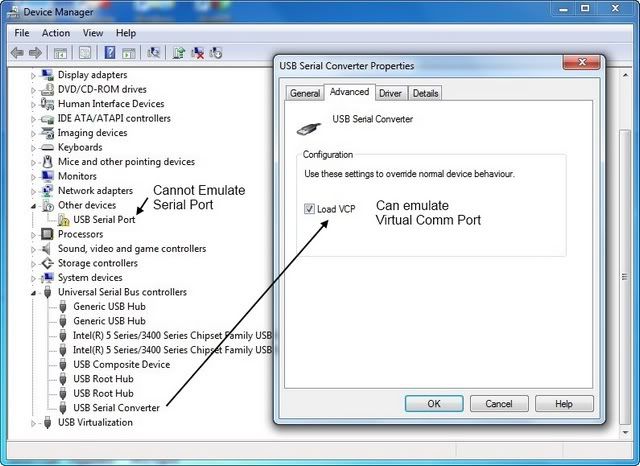
OK Finally figure what happen with the USB Driver for Win7 - 64 bits. The USB driver have 2 functional port.
1. serial port emulator
2. VCP - Virtual Comm Port

The correct port to be used is VCP. See below.

VCP2011-04-26_151004.jpg
 
Kudos to Jarance having the perfect skills+patience to elaborate this in picture...
meh, too busy today sorry so i just type something very fast for people to get a head start...

This is what i meant by having *This* close to conect PA soft interface witht the INPA Ediabas... only to find out that the china 20 PIN have a weakness!

They do not have Pin #1 in use which is very important in INPA/DISOBC readings...
 
jarance;630895 said:
I actually did that and I end up with my USB broadband modem getting screwed up when I plugged it in last night.

I have to reboot the computer for the USB to auto detect the device again.

Anyway. I have managed to compile the screen shot in PDF format. It about 8 pages. Need somebody to try out the
procedure in the group buy before I finalize it..

hky, where are you? call me pls.

sorry jarance, just saw your message, how can i help?
 
Top Bottom