Feedback on BMW Scanner 1.4.0

  • Click here to become an Official Member of BMW Club Malaysia Download Form
I concur with Jarance. To read DME key position must be at least to 'accessory' only. No need to start the engine unless you want to read live data.

jarance;611830 said:
Actually, for some test like Oil Reset and Cluster Light Test, you have to OFF the engine to do it.

This mean the key position need only to be selected to "Accessory" only.

I dont think you have to have the engine started to read the DME. However, if the engine is not running, then live data is also meaningless.
 
aidilj;611884 said:
If thats the case can we use 1.3.6 software with 1.4.0 scanner?

scottjoh has been doin some work on this. http://www.bmwgm5.com/PA_Soft_Intf.htm

A little more info
Code:
Folgende Übersicht zeigt, wie beispielsweise üblicherweise bei BMW der Stecker mit einer modernen OBD-2 Buchse verbunden wird, um mit einem gängigen KL-Interface am BMW die Diagnose durchführen zu können:

OBD II                BMW-Stecker
Pin                   Pin

16 ------------------- 14
15 ------------------- 15
                    -- 17
7  ----------------| 
                    -- 20
4  --
     |---------------- 19
5  --
source http://www.blafusel.de/obd/obd_multiplexer.html


I have the P.A Soft 1.3.6 software and cables, and now that I'm buying the version 1.4.0 from Jarance my 1.3.6 can be let go.

Anybody wants to buy it off me cheap cheap only.

Warning: Version 1.3.6 does not have coding data and live data, not sure if its of use to anyone. Error code also only states the code not the description in words. E.g 54D5
 
haywire;611459 said:
Referring to this:

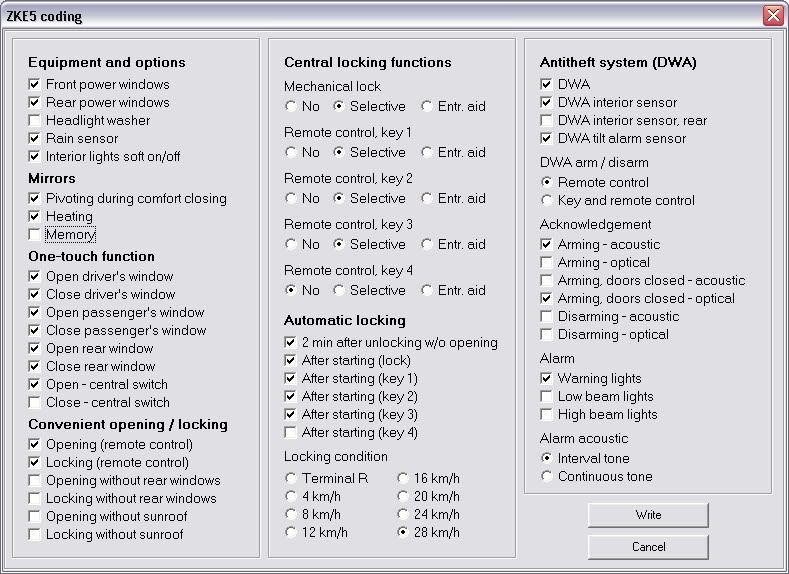
GM5Module.jpg


1) Auto-Lock when reached 28km/h. The problem was my Auto-Lock seem to be NOT FUNCTION even reached that speed

Did you tick all boxes under 'Automatic Locking'. Example: If you only tick 'the option for key 1, using key 2 wont lock the doors automatically. Tick all the boxes just to be sure.

2) key remote control needs to PRESS 2 times ONLY ALL 4 doors will OPEN. The 1st Press on the remote control ONLY will OPEN the DRIVER DOOR, then press again only ALL DOORS will OPEN. Before i make any setting i only need pressing ones the remote control will open all the doors.

Thats the options under 'Central Locking Functions' as above. I actually like this function. Saves you from bandits trying to hijack the car from the other side when you unlock the car. If he comes from behind you then you're f****d anyway :4:. If you dont want to press twice to unlock all doors, select all 'No' under the 'Central Locking Functions' and NOT 'Selective'

Hope this helps. Let me know if it works.


Bro,

Yes it works after i tick ALL the boxes under Automatic Locking. But it was auto lock faster then 28km/h which i selected. Thanks ya for the guidance
 
Alex5522;611975 said:
Bro,

Yes it works after i tick ALL the boxes under Automatic Locking. But it was auto lock faster then 28km/h which i selected. Thanks ya for the guidance

If you want to lock earlier, tick slower speeds lah. I chose 16km/h for my car.
 
haywire;611967 said:
I have the P.A Soft 1.3.6 software and cables, and now that I'm buying the version 1.4.0 from Jarance my 1.3.6 can be let go.

Anybody wants to buy it off me cheap cheap only.

Warning: Version 1.3.6 does not have coding data and live data, not sure if its of use to anyone.
Error code also only states the code not the description in words. E.g 54D5

How cheap is cheap?? LOL.
 
Guys, can we have more screenshot of "before" and "after" of various modules function.
 
haywire;611977 said:
If you want to lock earlier, tick slower speeds lah. I chose 16km/h for my car.

NO i don't want to lock earlier that's why i select 28km/h which was the slower, but b4 20km/h the doors already lock.
 
Alex5522;611990 said:
NO i don't want to lock earlier that's why i select 28km/h which was the slower, but b4 20km/h the doors already lock.

This was confusing heheheh. You want to lock slower in TIME but faster in SPEED. hehehe
 
haywire;611995 said:
This was confusing heheheh. You want to lock slower in TIME but faster in SPEED. hehehe

haywire, alex is saying that his door start to lock when the speed reaches 20km/h even though he set it at 28km/h lar.
 
Did it means when i tick(select) 28km/h, my door will lock when i reaching that speed ?
 
haywire;611995 said:
This was confusing heheheh. You want to lock slower in TIME but faster in SPEED. hehehe


Can't understand your statement lar bro ?
 
jarance;612004 said:
haywire, alex is saying that his door start to lock when the speed reaches 20km/h even though he set it at 28km/h lar.

I know lah, just saying thats its confusing with the 'earlier' and 'faster' terms, which was in time or speed.

Bro Alex, yes it should be at that speed, but maybe the car speed not calibrated properly?
 
Alex5522;612014 said:
Can't understand your statement lar bro ?


If you want to want to lock you car as FASTER car speed, its 28km/h (but say takes 6 seconds to reach that speed - slower time). If slower in speed, its 8km/h (but takes only 2 seconds to reach that speed, so faster in time)

This is all assuming the acceleration is constant. Confused yet?
 
jarance;612022 said:
In order to avoid anymore confusion, please post the screenshot of your present setting.


Sifu still learning how to post screen shot la.. LOL
 
I think I might know the problem.

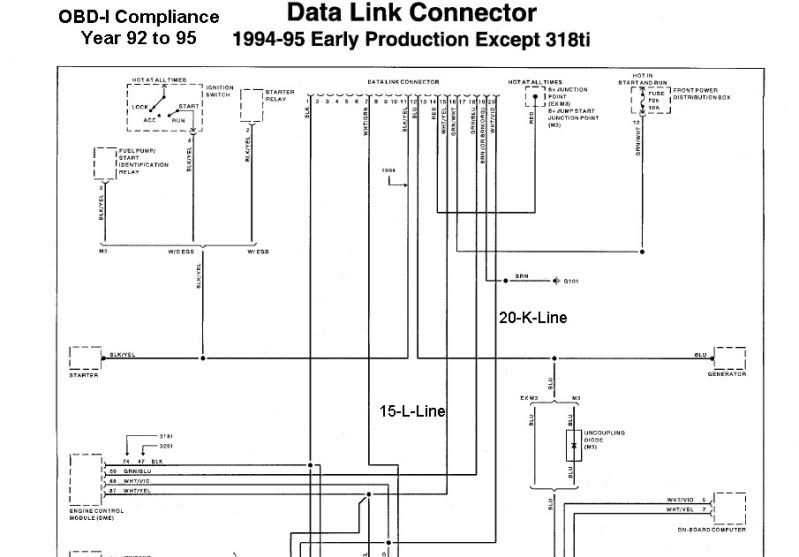
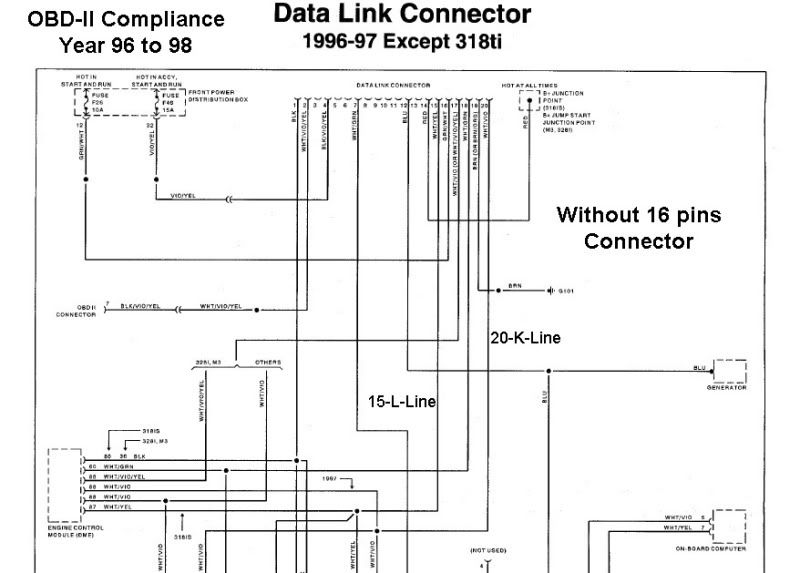
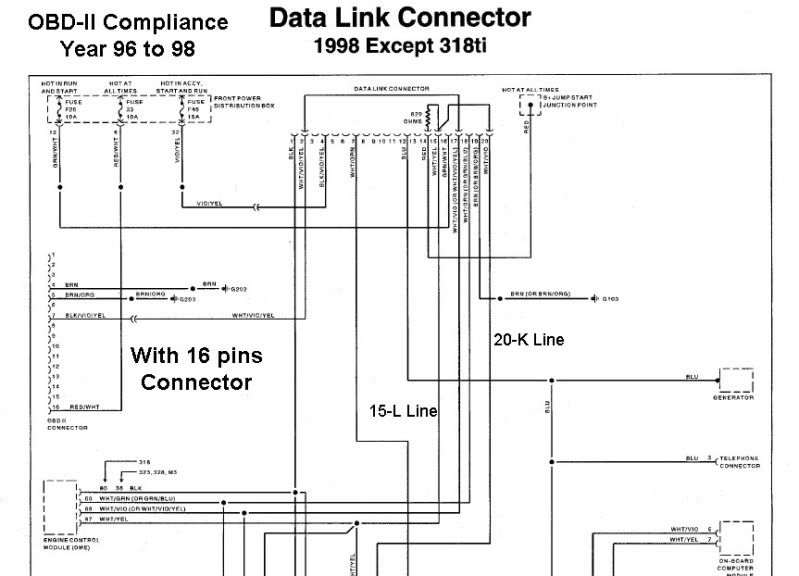
here is a wiring diagram of the Data Link PinOut Transistion from 1992 till 1998.
OBD-I compliance is for car built from 92 till 96
OBD-II compliance is for car built from 96 till 98.

I have enclose the wiring diagram transition from:-
1. OBD-I compliance - 20 pins connectors
2. OBD-II compliance - 20 pins connectors
3. OBD-II compliance - 20 pins connector linked to 16 pins connectors.

1. OBD-I compliance - 20 pins connectors
DataLink1.jpg


2. OBD-II compliance - 20 pins connectors
DataLink2.jpg


3. OBD-II compliance - 20 pins connector linked to 16 pins connectors.
DataLink3.jpg


I think I know what is the problem for E36 but cannot confirm until I test it out later..
 
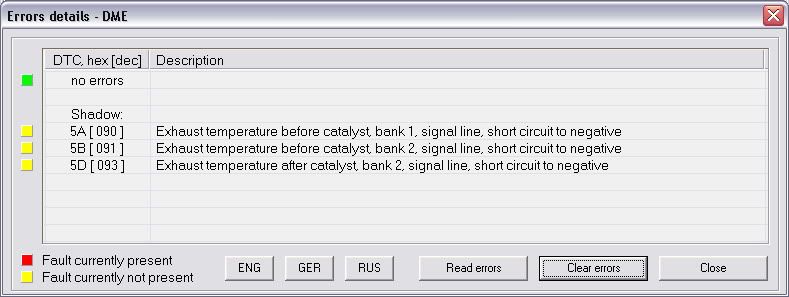
I have these fault codes in the Shadow Memory which cannot be cleared.
DME -> Shadow-memory:
5A/12 - Exhaust temperature before catalyst, bank 1, signal line, short circuit to negative
5B/12 - Exhaust temperature before catalyst, bank 2, signal line, short circuit to negative
5D/12 - Exhaust temperature after catalyst, bank 2, signal line, short circuit to negative

Any bro know what they mean, I do not see any temp sensor pre of post CAT.

E46 M54
 
IanDaddy;612103 said:
I have these fault codes in the Shadow Memory which cannot be cleared.
DME -> Shadow-memory:
5A/12 - Exhaust temperature before catalyst, bank 1, signal line, short circuit to negative
5B/12 - Exhaust temperature before catalyst, bank 2, signal line, short circuit to negative
5D/12 - Exhaust temperature after catalyst, bank 2, signal line, short circuit to negative

Any bro know what they mean, I do not see any temp sensor pre of post CAT.

E46 M54

Me too!!
error_01.jpg
 
Top Bottom