Feedback on BMW Scanner 1.4.0

  • Click here to become an Official Member of BMW Club Malaysia Download Form
solo;611054 said:
Did you clone the old key's transponder? Without the transponder, you can only open doors and not start the car.

Salut

Yes, the transponder has to be clone..no idea how but for my old 96 E38 there's a small chip inside the car key...
 
Hi, did anyone manage to get into the A/C screen? Are you able to access the Recoding button? Mine is not accessible, not sure if its due to me not having the original radio unit.
 
YaZmEeN;610808 said:
Tried on my E38 year 1996 and it works. But didn't have the time to explore except clearing the errors.

Will try later to my father's E66...good stuff I can say.

Thx Jarance for the GB effort...hope u have more good things to share in BMWCM!

The E66 cannot be use for this scanner. The red light came up when plug in, but got this error

~Connection error with IKE

~Connection error with EWS(maybe, forgotten already)
 
solo;611054 said:
Did you clone the old key's transponder? Without the transponder, you can only open doors and not start the car.

Salut

Original key come with ELM transponder. New key come with PCF7935A transponder. So how?
 
YaZmEeN;611059 said:
The E66 cannot be use for this scanner. The red light came up when plug in, but got this error

~Connection error with IKE

~Connection error with EWS(maybe, forgotten already)

I think you may need to use the Version 2.0 which is designed for newer chassis. like E90 or E60..
 
hky;611057 said:
Hi, did anyone manage to get into the A/C screen? Are you able to access the Recoding button? Mine is not accessible, not sure if its due to me not having the original radio unit.

Same here too. The aircon recode button is not available.. I also want to default it to "recirculation mode"..
 
My first key and 2nd key has different AC settings, wonder where to set them.
 
jarance;611065 said:
I think you may need to use the Version 2.0 which is designed for newer chassis. like E90 or E60..

Hi Bro,

If use the new software, will the existing cable usable?
 
I doubt so since they sell a different version for the newer chassis.
 
hky;611069 said:
My first key and 2nd key has different AC settings, wonder where to set them.

Thats KEY memory, its set to the preferences according to the individual keys. It remembers your last setting when using the car with the key. The software will change the CAR memory.
 
bmwjackiee36;611072 said:
Hi Bro,

If use the new software, will the existing cable usable?

For dash 2.0, the USB driver is different. It emulate a virtual com port for the USB port.

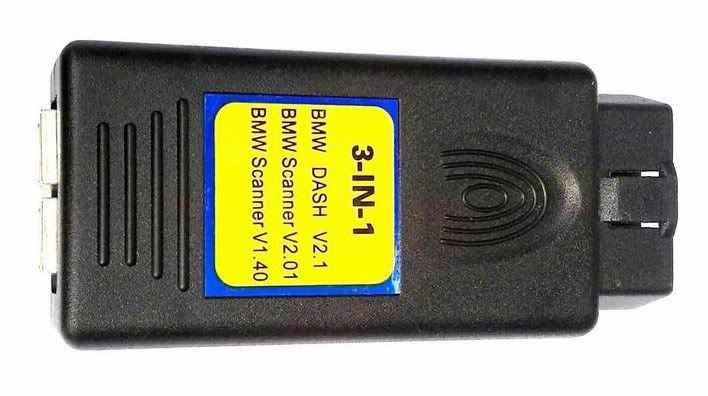
I have a 3 in 1 scanner (advance version) and it have 2 USB port (1 for Scanner 1.4 and the other for the newer chassis)

3505020A.jpg
 
Please confirm Live Data for your car with the scanner.

Live Data Available.
1. Jarance - E46/2005 - 325i M-Sport
2. B33mer - E46/2002 - 330i SMG M-Sport2 Euro Spec
3. haywire - E39/2003 - 530i UK import.

Live Data Not Available.
1. T2ribena - 2001 E39 M5 S62B50
2. XXX - E39/
 
IanDaddy;610818 said:
Strange, I managed to get the beep when I unlock. When locking with remote I managed to get it to beep once but it did not work after. Jarance, did you code with the engine running or just ON ?
I tried the DRL but does seem to work except the EU/US option.

Next is the change some settings checking of light bulbs like the parking light etc. Can have highpower LED without the resistor ,some of those with built it resistor cost a bomb.


Jarance,
I think you can use read the eeprom and save those HEX file, Which can be used to revert back the settings by writing back to the eeprom.

Yes, all the data from the eeprom can be backup. It will be useful to have a back up cos some of the modules are not plug and play
when you need to change them.
Hence you need to reflash it in order for it to work properly with your car.
 
jarance;610902 said:
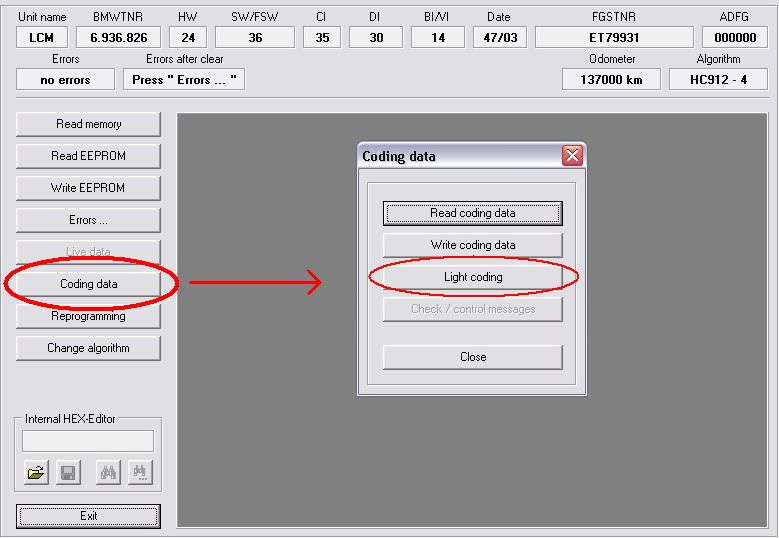
Alex, click on LCM and do the following:-
LCM.jpg

Bro

Thank you for the guidance and manage to reach on this step as follow ur instruction. Infect i'm looking for ZKE module.
I did manage to change my Interval Oil Service to 8k km instead of 25k km, the 12hrs Clock Mode and Auto-Lock when reached 28km/h. The problem was my Auto-Lock seem to be NOT FUNCTION even reached that speed and the key remote control needs to PRESS 2 times ONLY ALL 4 doors will OPEN. The 1st Press on the remote control ONLY will OPEN the DRIVER DOOR, then press again only ALL DOORS will OPEN. Before i make any setting i only need pressing ones the remote control will open all the doors.
Really need to take sometimes to learn on this toys.
 
Alex5522;611276 said:
Bro

Thank you for the guidance and manage to reach on this step as follow ur instruction. Infect i'm looking for ZKE module.
I did manage to change my Interval Oil Service to 8k km instead of 25k km, the 12hrs Clock Mode and Auto-Lock when reached 28km/h. The problem was my Auto-Lock seem to be NOT FUNCTION even reached that speed and the key remote control needs to PRESS 2 times ONLY ALL 4 doors will OPEN. The 1st Press on the remote control ONLY will OPEN the DRIVER DOOR, then press again only ALL DOORS will OPEN. Before i make any setting i only need pressing one time the remote control will open all the doors.
Really need to take sometimes to learn on this toys.

what is your present setting of the ZKE5 Module? Give a screenshot. How to advise when dont know your setting?
 
jarance;611278 said:
what is your present setting of the ZKE5 Module? Give a screenshot. How to advise when dont know your setting?

Don't know how to post screenshot la bro, not good in computer.
I press the ZKE and the screen come out and just go to change the locking condition to 28km/h as u can see the screenshot has posted by haywire on pg5 #42 on this thread.
 
Alex5522;611286 said:
Don't know how to post screenshot la bro, not good in computer.
I press the ZKE and the screen come out and just go to change the locking condition to 28km/h as u can see the screenshot has posted by haywire on pg5 #42 on this thread.

That screenshot is my car setting lar.

better learn how to do screen shot. I use ACDsee to do it. If you dont have, you can use the command "PrtSc" and paste it using Window Paint.
Save it as jpeg format instead of BMP. You can use paint to trim the picture and unload it after editing.
 
jarance;611291 said:
That screenshot is my car setting lar.

better learn how to do screen shot. I use ACDsee to do it. If you dont have, you can use the command "PrtSc" and paste it using Window Paint.
Save it as jpeg format instead of BMP. You can use paint to trim the picture and unload it after editing.

Opss.. that was your car screen shot, i thought it was haywire ones bcoz the posting was from him he..he...

Btw let me learn how to do screen shot first. Thanks
 
In case you don't know.

A folder is created each time you do a scan (e.g. C:\BMWScan140\26-02-11_4-10-07-PM) . You can see the log there and also the binary files of those you save from the modules.
 
Top Bottom