Feedback on BMW Scanner 1.4.0

  • Click here to become an Official Member of BMW Club Malaysia Download Form
jarance;647994 said:
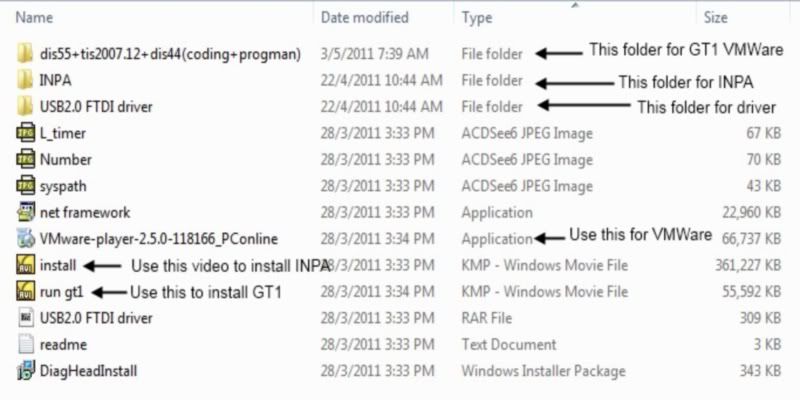
alex, the DVD info as follow:-

You need a media player to play the AVI files.

InstallDVD.jpg

My Win7 laptop hang the whole screen can't activate, the old sickness was coming bck and need to sent for repair. Now i put the CD to my Win XP laptop and Win7 desktop but i don't know why both the computer can't read this CD at all:102::102::102:
 
Installing Problem on Window 7 Home Premium 64 Bit

Guys,

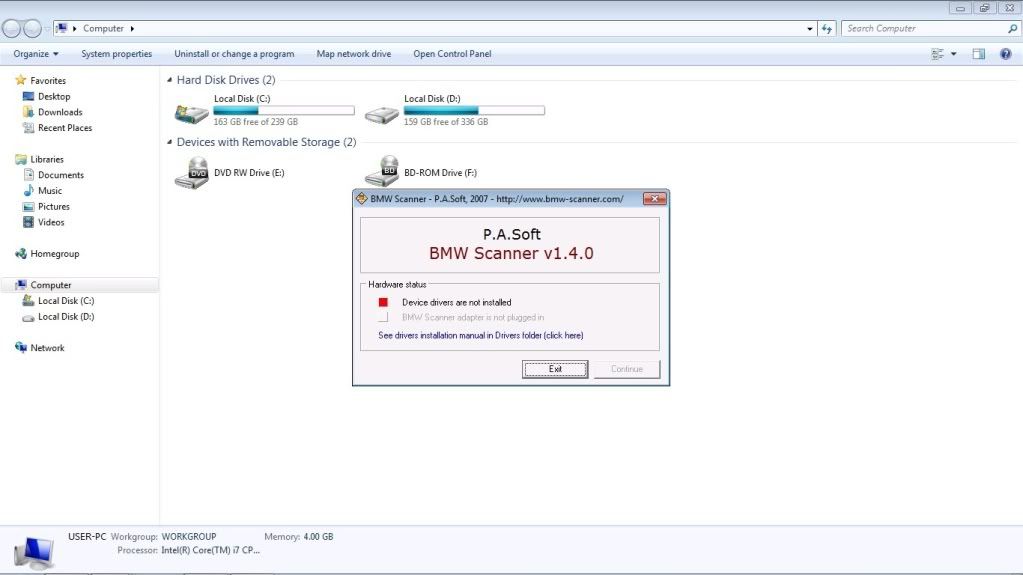
After buying the scanner for a long time, only now manage to try installing them. However came across some problem as per pic below.

Drivernotinstalled.jpg


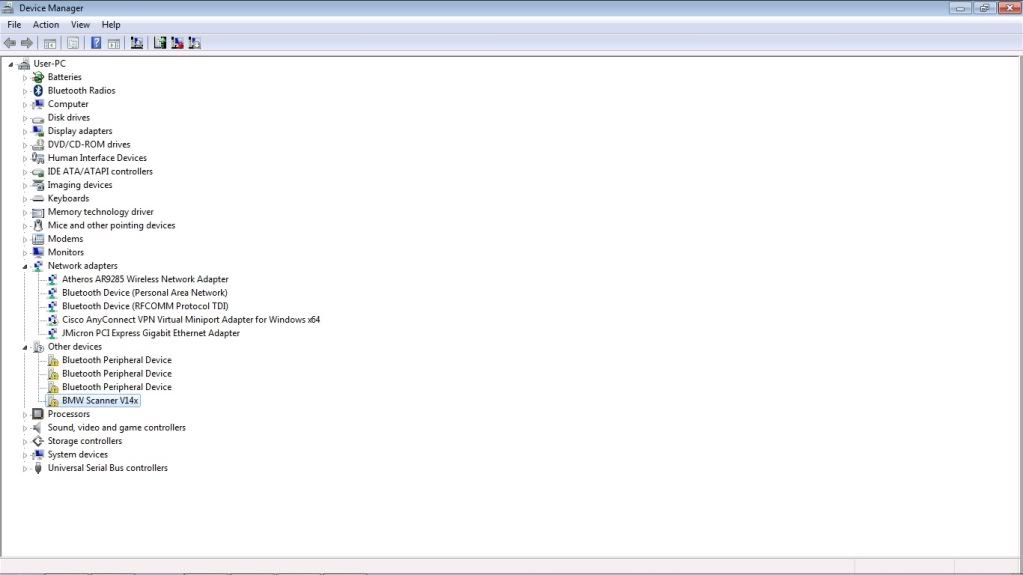
And at the device manager :

Devicemanager.jpg


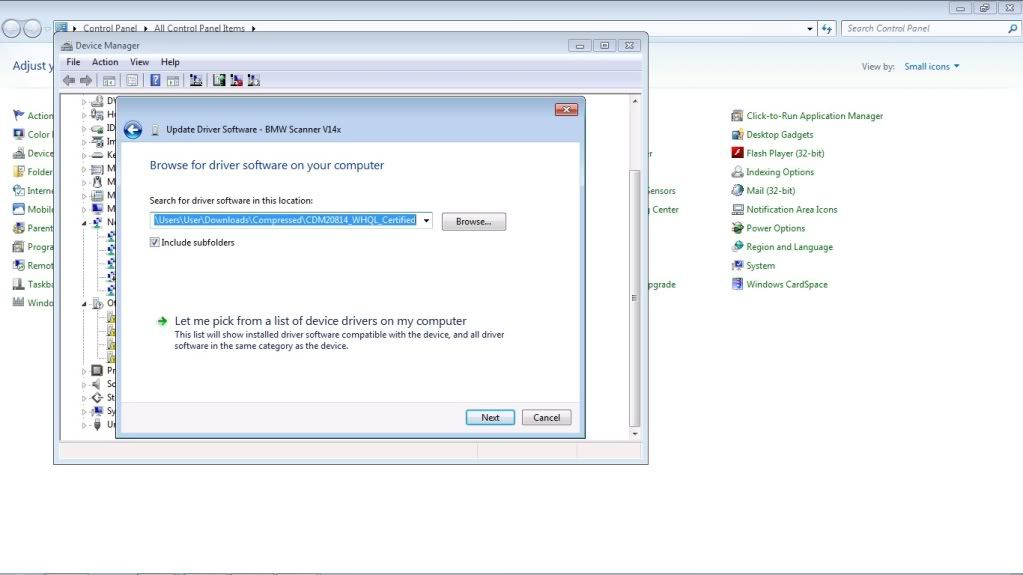
So i dload the driver as at the page below:

dloaddriver.jpg


and update the driver:

updatedriver.jpg


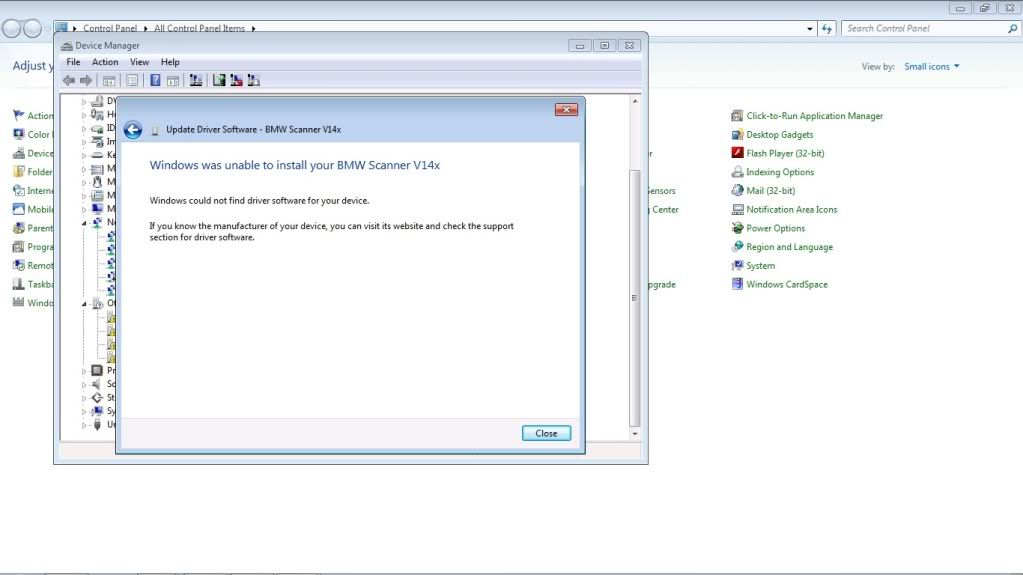
failed:

unabletoinstall.jpg


any input guys?

thanks
 
irdanlz84;648205 said:
any input guys?

thanks

bro, pm me your email address. I will sent you the proper way to setup for win7-64bits in pdf format.

hky have use my procedure and it works.
 
jarance;648216 said:
bro, pm me your email address. I will sent you the proper way to setup for win7-64bits in pdf format.

hky have use my procedure and it works.

Hi Jarance, can I have that too. I've installed the driver but havent tried it with the car. I'm also on Win 7 home premium 64bit

Do I need to install both "USB serial converter" and "USB serial port"? Can I just install one (USB serial port) since it looks cleaner it my device manager? From your previous post, seems it is not possible http://www.bmwclubmalaysia.com/foru...on-BMW-Scanner&p=630994&viewfull=1#post630994

Cheers, happy to join the scanner discussion now
 
aidilj;648255 said:
Hi Jarance, can I have that too. I've installed the driver but havent tried it with the car. I'm also on Win 7 home premium 64bit

Do I need to install both "USB serial converter" and "USB serial port"? Can I just install one (USB serial port) since it looks cleaner it my device manager? From your previous post, seems it is not possible http://www.bmwclubmalaysia.com/foru...on-BMW-Scanner&p=630994&viewfull=1#post630994

Cheers, happy to join the scanner discussion now

aidil, not to worry. I have got it to work on my win7-64bits home edition. will send you the procedure soon.

btw, I dont have your email. please PM me. cheers
 
Great after sale support hahaha... BTW Bro AidilJ can you share how you install GT1 in Win7 64bit and make it work? i cant seem to let the program talk to the interface... :(

The same problem with communication...

BTW ive cleared a lot of problems recently with INPA now my dashboard is clean except for the airbag hu buhuh)
 
xcrave;648368 said:
Great after sale support hahaha... BTW Bro AidilJ can you share how you install GT1 in Win7 64bit and make it work? i cant seem to let the program talk to the interface... :(

The same problem with communication...

BTW ive cleared a lot of problems recently with INPA now my dashboard is clean except for the airbag hu buhuh)

Heya xcrave, hmm it has been awhile since I did that install, forgot all the details already, need to refresh.

I essentially followed all the PDFs included in the 4shared site, if you follow the instructions to the letter you wont go wrong.

So you got INPA/EDIABAS working right, mean the EDIABAS driver is working properly. You need to run the IFHservice, turn off firewall, then start DIS vmware. The error is inside VMware? see if this link helps http://www.bmwclubmalaysia.com/foru...d-INPA-working&p=616232&viewfull=1#post616232

Need more info in order to help

PS: how you know to spell my name like that..?
 
jarance;648216 said:
bro, pm me your email address. I will sent you the proper way to setup for win7-64bits in pdf format.

hky have use my procedure and it works.

pm sent bro..
 
Dear All,

I think it is best if you run DIS using VM Player. Just get one vm properly setup, then others can just install ediabas and share. I have tried running DIS V44 with the vmdk file on an external harddisk and the performance was good. I will try DIS V57.

We should set up a file share site for this purpose. What say you Jarance ?
 
IanDaddy;648506 said:
Dear All,

I think it is best if you run DIS using VM Player. Just get one vm properly setup, then others can just install ediabas and share. I have tried running DIS V44 with the vmdk file on an external harddisk and the performance was good. I will try DIS V57.

We should set up a file share site for this purpose. What say you Jarance ?

IanDaddy, I think that is what provided to whom that bought the DCAN interface with the included DVD. Look at the screenshot of DVD content that Jarance posted earlier. But only V44 is included not V57, waiting on you for that..
 
IanDaddy;648506 said:
Dear All,

I think it is best if you run DIS using VM Player. Just get one vm properly setup, then others can just install ediabas and share. I have tried running DIS V44 with the vmdk file on an external harddisk and the performance was good. I will try DIS V57.

We should set up a file share site for this purpose. What say you Jarance ?

dropbox maybe?
 
aidilj;648518 said:
IanDaddy, I think that is what provided to whom that bought the DCAN interface with the included DVD. Look at the screenshot of DVD content that Jarance posted earlier. But only V44 is included not V57, waiting on you for that..
You are right, I have got the same DCAN too bought earlier but I don't use what is on the DVD.

i already have a running V57 on another laptop, I just need to save the vm. I have been running V44 on an external HD because my laptop has not got the space on the internal HD.
 
jarance;648522 said:
dropbox maybe?

IanDaddy;648538 said:
You are right, I have got the same DCAN too bought earlier but I don't use what is on the DVD.

i already have a running V57 on another laptop, I just need to save the vm. I have been running V44 on an external HD because my laptop has not got the space on the internal HD.

How big is the image? Free dropbox is at max of 2GB, also need considering is the bandwidth limit.
 
The image is like 18GB, I fully allocated it during creation as I have problem otherwise.
 
aidilj;648395 said:
Heya xcrave, hmm it has been awhile since I did that install, forgot all the details already, need to refresh.

I essentially followed all the PDFs included in the 4shared site, if you follow the instructions to the letter you wont go wrong.

So you got INPA/EDIABAS working right, mean the EDIABAS driver is working properly. You need to run the IFHservice, turn off firewall, then start DIS vmware. The error is inside VMware? see if this link helps http://www.bmwclubmalaysia.com/foru...d-INPA-working&p=616232&viewfull=1#post616232

Need more info in order to help
Hmmm... will do that on the weekends when i really have time to fiddle with it just finished my retrofit at last :p

PS: how you know to spell my name like that..?

Hahahaha... :p Aidil J.
 
xcrave;648556 said:
Hmmm... will do that on the weekends when i really have time to fiddle with it just finished my retrofit at last :p

Wah retrofit done..? Must show picture..!
 
jarance;648216 said:
bro, pm me your email address. I will sent you the proper way to setup for win7-64bits in pdf format.

hky have use my procedure and it works.

Hi Jarance, can I have that too. I have the same problem as bro irdanlz84. i'm run with win7 32bit
 
Mtigo;651343 said:
Hi Jarance, can I have that too. I have the same problem as bro irdanlz84. i'm run with win7 32bit


OK send the file to you. You should not have any problem with Win7-32 bit with the existing procedure.

check out posting #8 for more info.
 
Top Bottom