Feedback on BMW Scanner 1.4.0

  • Click here to become an Official Member of BMW Club Malaysia Download Form
IanDaddy;610620 said:
Mind telling what are the sites. I have show faults stored in the shadow memory too.

Jarance, there is also the red (fault currently present) and yellow (fault not currently present) color code for each of these fault codes. Does yellow mean, like you mentioned is history ?

Also the code is in HEX so 5A is 90 in decimal, what is the P code equivalent for this P090 ?

Sorry , so many questions.

Alex have post a link to the error code on e46fantic. check it out

http://forum.e46fanatics.com/showthread.php?t=303141
 
jarance;610424 said:
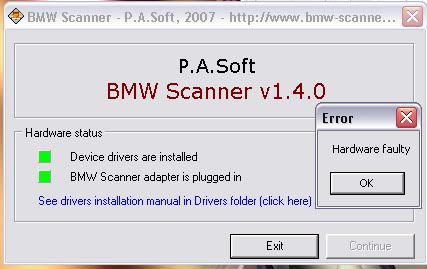
Issue #1. - Hardware Faulty.

When you installed the driver and try to run the program, you will get an error "Hardware Faulty"

This is not the scanner problem. To solve this problem, just plug the scanner to the diagnostic port and try again.

Capture.jpg

Bro it appear like this lar

View attachment 18422
 
By the way u don't mind to show me the pic "ON" led light it looks like when it was detected.
Thanks.
 
e39-Boy;610598 said:
Heh heh...now the question starts... What's shadow memory ? Searched other sites and it says this is ignorable.. Anyone ?

Ya.. now the ? starts and u will be very busy LOL....
 
IanDaddy;610586 said:
I just got it to work no problem. You have to push the scanner firmly into the slot, you should see a red LED near the label on the scanner lights up. So far recoded my remote open door with acoustic signal.

Bro minds to share the pic how's the red lights up. Thanks
 
Alex5522;610638 said:
Bro minds to share the pic how's the red lights up. Thanks

Ha.. ha.. forgot to mention this. The black label or sticker on the "bmw" label. Peel it off and you will see the LED below it.

Red LED is for power ON and Green LED is for data transmission.
 
jarance;610615 said:
bro, sorry did not have time to scan your car.

btw, where did you go lar. I was looking for you and IM after I have done digitalpunk computer.

i know you were busy last nite, helping the others to set up the program. mine is little itch only, it can wait no rush.

we including harbhajan went to the mutiara TT afterwards and stayed until 2.30am.
 
jarance;610641 said:
Ha.. ha.. forgot to mention this. The black label or sticker on the "bmw" label. Peel it off and you will see the LED below it.

Red LED is for power ON and Green LED is for data transmission.

:eek:Ya just notice the insulation tape and peel it off now can see the RED lights up, but my pc still show it was unplug lar.. infect already plug in & out more then 10 times.
Maybe the usb cable got something wrong i guess. Any comments on how to check the usb cable is works ?
 
Alex, try to plug in the scanner first before you start the program. Also check the installation of the driver, go to Windows Device Manager and look under Universal Serial Bus, you should see a BMW Scanner entry. If got exclamation mark ! right click to update the driver.
 
Funny the DME can only be scanned after ignition, what happens if the engine would not crank ? You will not be able to get the fault codes.
Also , I think some of the functions are advance and can be dangerous if done wrongly or accidentally. e.g. the disable car keys, I wonder if this process is reversible , if not you don't want to disable it and end up having to get new keys.

Jarance, I am trying the look for a user guide or manual on the Net. Even if it is in Russian !
 
IanDaddy;610648 said:
Alex, try to plug in the scanner first before you start the program. Also check the installation of the driver, go to Windows Device Manager and look under Universal Serial Bus, you should see a BMW Scanner entry. If got exclamation mark ! right click to update the driver.


Thanks bro

Ya now i notice the BMW Scanner driver need to be update, but then problem rise up my pc can't update the driver due to the securities (firewall or anti-virus) problem i guess. Have being try update the BMW Scanner few times but still failed.
Need some one good in computer to help lar... Me not good enough on computer.
 
Alex5522;610653 said:
Thanks bro

Ya now i notice the BMW Scanner driver need to be update, but then problem rise up my pc can't update the driver due to the securities (firewall or anti-virus) problem i guess. Have being try update the BMW Scanner few times but still failed.
Need some one good in computer to help lar... Me not good enough on computer.

Alex,
If your laptop is used in corporate environment, there could be Active Directory policy applied to the laptop which disallow installations of the driver. You need to login as Administrator in that case,

I think the software itself can install is because it does not register in the Windows Registry, it has evolve from the earlier DOS/Windows 95 era. I need to go deeper into this to confirm.
 
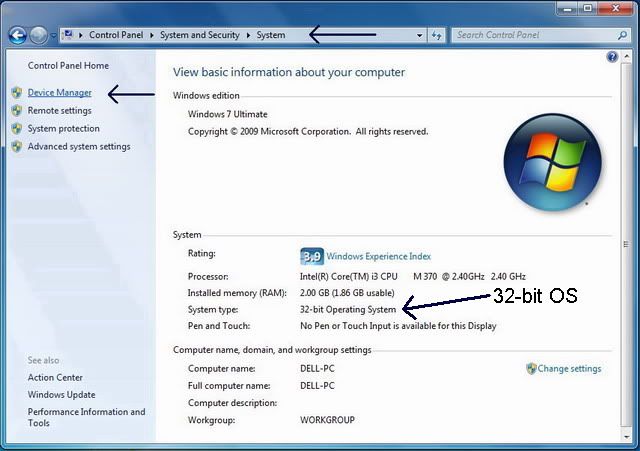
jarance: those windows 7 machine that u manage to install driver, are those win 7 64bit?
 
gnik;610659 said:
jarance: those windows 7 machine that u manage to install driver, are those win 7 64bit?

sorry did not pay any attention to the version of the laptops. Too many people want to install at the same time.

I know mine is 32 bits OS.

inst03.jpg
 
Hi Jarance,

Installed the programme (full ver.) and got the scanner up and running.. however i dont not sure what to do with it. hehehe.. did a scan and found some errors, tried to clear it but not all can be cleared. Can share what are the things that we can do with the scanner? many thanks
 
Got mine to work ... i download the program directly and run the .exe. Could be that when copy from jarance thumd drive and try to run the program, it didn't register in Win7 registry. Need to download then install.
 
Top Bottom